Senior Care ConnectedPowered by GDI Digital Solutions
A caregiver and a smiling senior sharing a moment outdoors

Software for adult day centers

Check people in each morning. Your DSS invoice fills in from that.

Staff record attendance, meals, medications and incidents on a tablet or laptop. Families can see how the day went. When the month ends, your DSS invoice is already built from attendance.

14 days free. No credit card.

One screen for the whole day

Each participant has a card. Staff mark them present when they arrive, then tap meals, rides and toilet times as the day goes. Nothing gets written down twice.
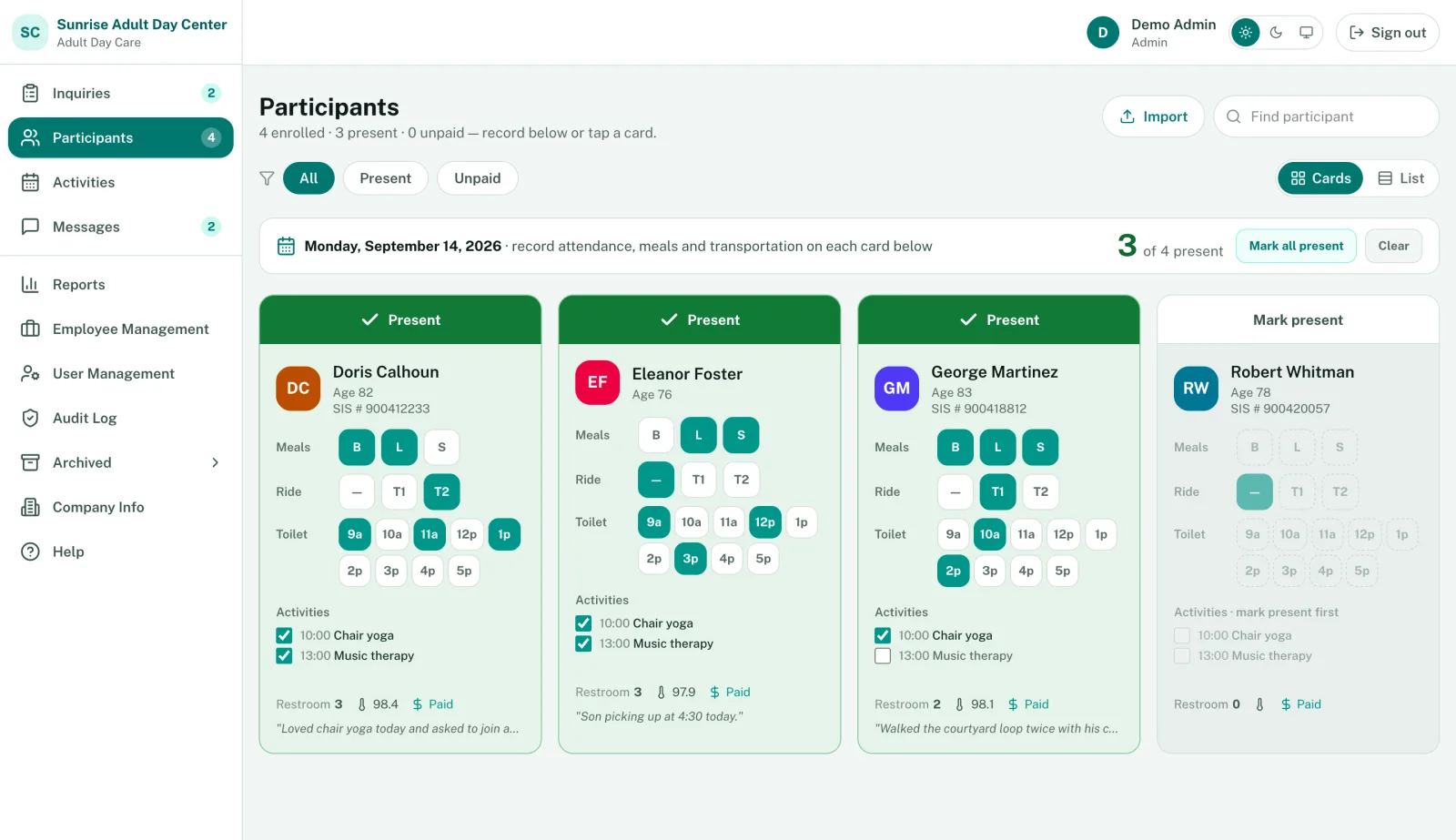
Participants screen with a card for each participant to mark attendance, meals, rides, toileting and today's activities
  1. The count at the top goes up as people arrive.
  2. Tap the top of a card to mark someone present.
  3. Meals, rides and toilet times are one tap each. Rides also count toward DSS transportation.
  4. Today's activities come from your calendar. Check off who joined.

Shown with sample participants.

DSS billing, straight from attendance

If you bill DSS, you know the routine. Here, the invoice is built from the attendance your staff already took.

The way it usually goes

  1. Count each person's days off the sign-in sheets
  2. Type the units into the DSS template
  3. Check it twice, then fix it when someone calls

In Senior Care Connected

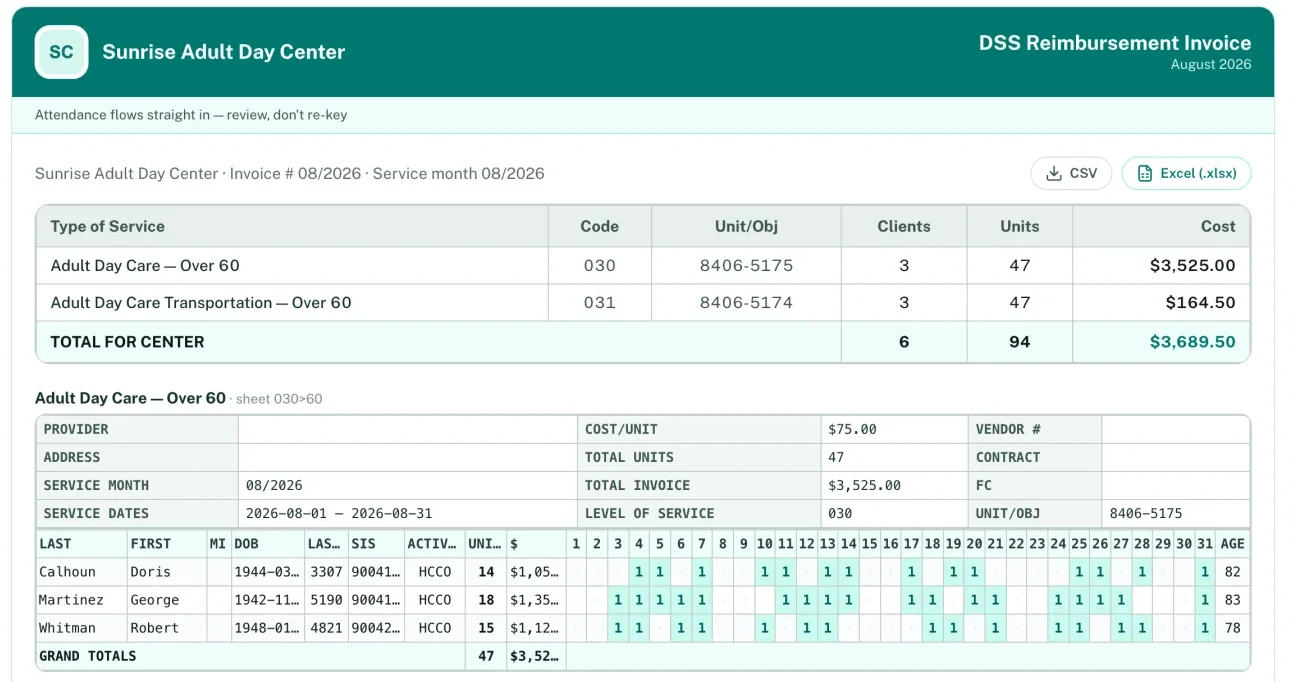
The DSS reimbursement invoice: a service summary with units and cost, and the Adult Day Care over-60 sheet listing each participant's billed days
  1. Every day someone attends is already a unit on the right sheet
  2. Rides land on the transportation sheet on their own
  3. Look over the totals and download CSV or Excel

Not everyone is on DSS. You can mark participants as Private Pay, Medicaid CAP or VA, and private pay families can pay their invoices online.

How DSS billing works

Families see the day on their phone

When a participant is signed in, their family can see it. They also see the day's activities, photos, and a note from staff, and they can message the office without calling.

The iPhone and Android apps come with every plan. Families who'd rather not install anything can use the same portal in a web browser.
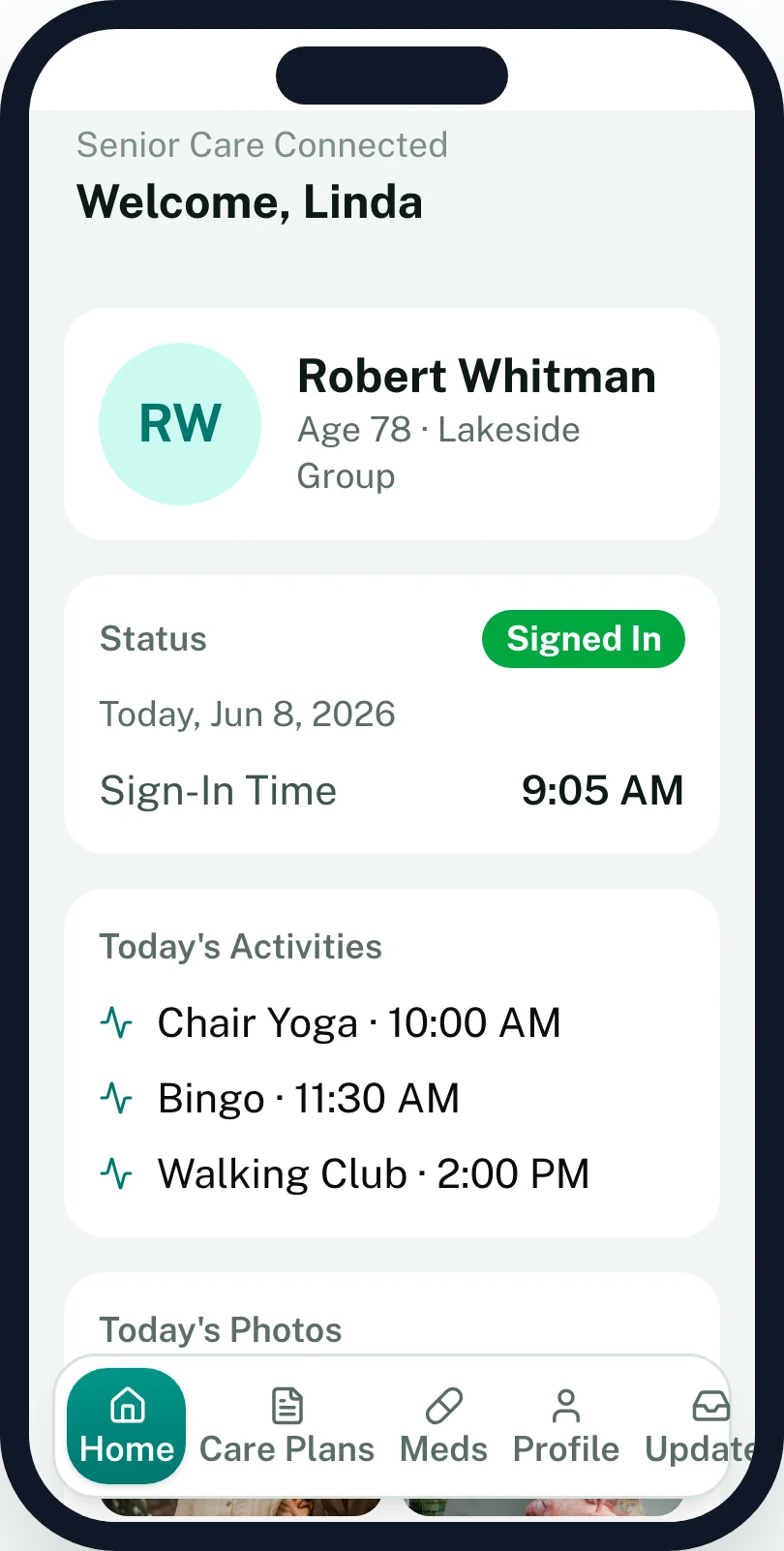
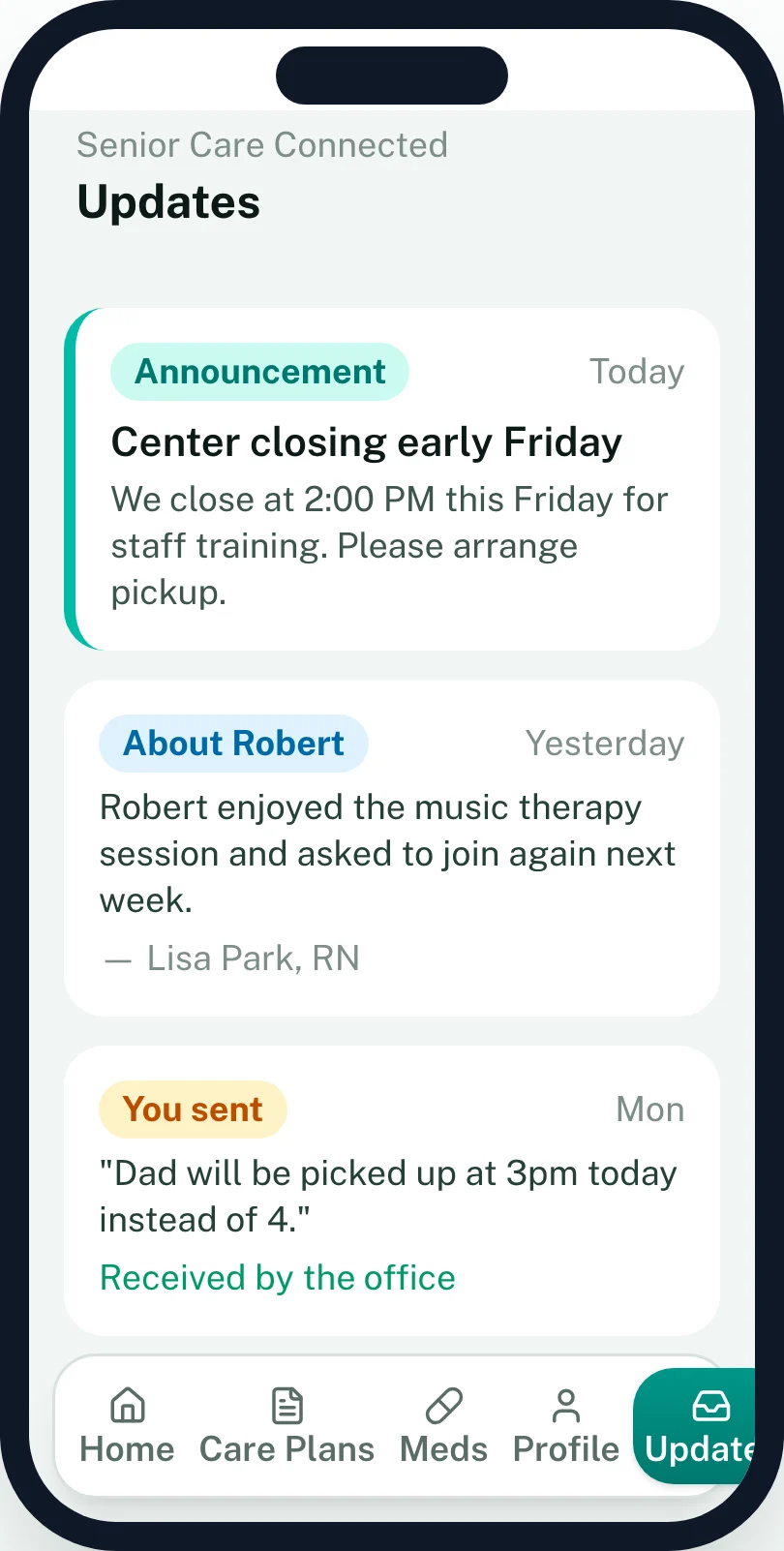
The family app on a phone: a participant signed in at 9:05 AM, today's activities, and photos from the dayThe family app's Updates tab: a center announcement, a note from the nurse, and a message the family sent

The rest of what's in it

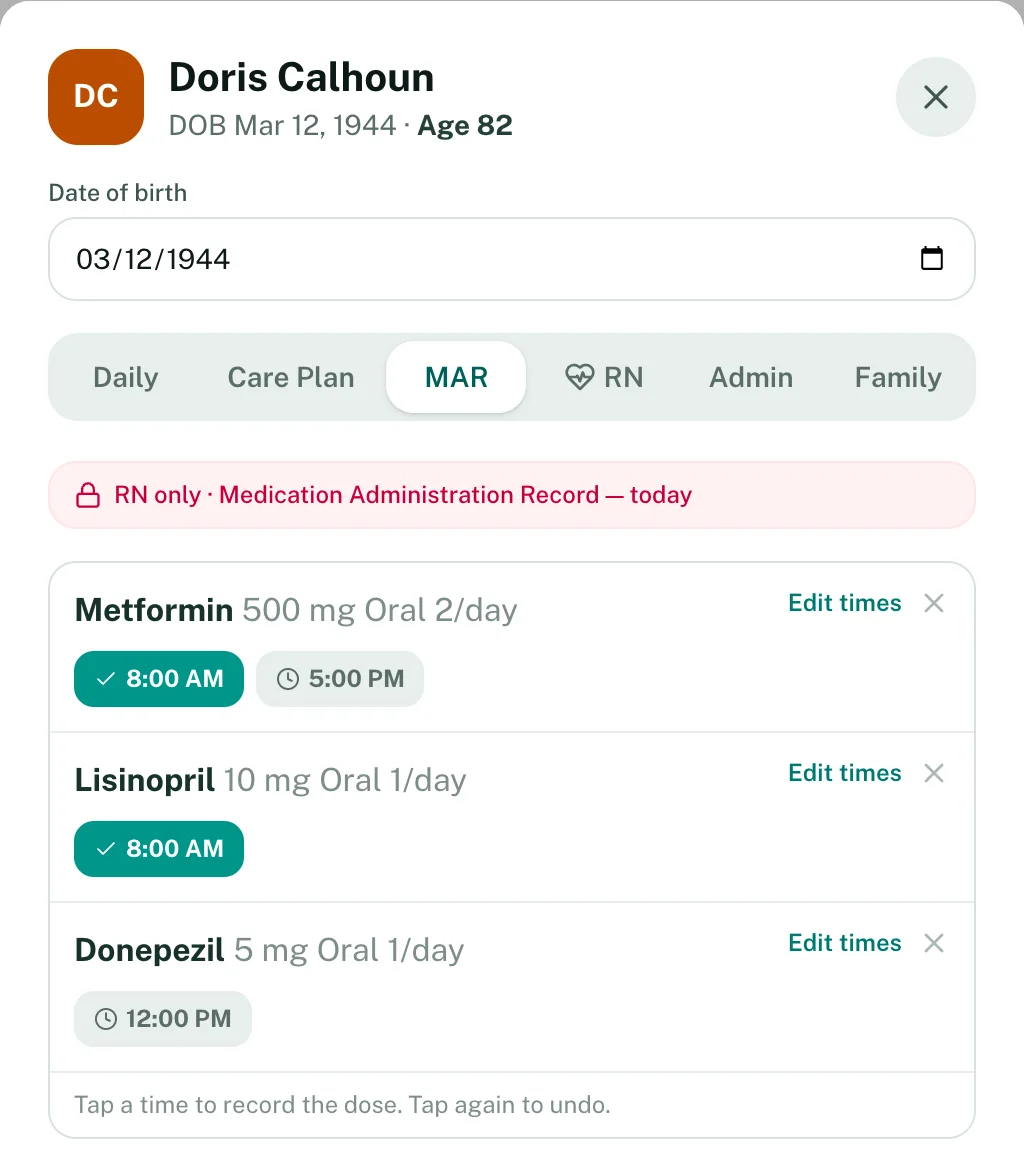
A participant's chart open to the MAR tab, showing each medication's scheduled times with given doses checked off
  1. Green means given. Staff tap the time when they give the dose.
  2. Grey times are still due today.
  3. Change the times when an order changes.
Medications
Scheduled times for each medication. Staff tap a time when the dose is given.
Care plans
Nursing diagnoses, goals and approaches, with review dates tracked.
Incidents
What happened, what staff did, and whether the family was told. Print it for the file.
Families
A portal with attendance, photos and invoices, and messages in both directions.
Enrollment
Send the application and admission forms as a link. Families fill them in and sign.
Reports
Attendance, meals, transportation, toileting and fire drills, under your center's name.
Staff
Roles, permissions, and alerts before credentials expire.
Security
Encrypted records, role-based access, an audit log, and a signed BAA with every center.
See every feature

Pricing

Plans are based on how many participants you serve. The prices are right here, so you don't have to call for a quote.

Compare the plans

Professional

Most popular

$399 a month

Up to 75 participants

Adds hiring tools and phone support.

  • Everything in Starter
  • Employee management and hiring
  • Phone and email support
Start free trial of Professional

Enterprise

$599 a month

No participant limit

For larger programs and more than one location.

  • Everything in Professional
  • Transportation, routes and driver checklists
  • QuickBooks sync for invoices, payments and customers
  • Multiple locations
and 4 more in EnterpriseStart free trial of Enterprise

Questions we hear a lot

Have a different one? Send us a note or book a demo and ask us directly.

How long is the free trial?
14 days. You don't need a credit card, and you can cancel anytime.
Which plan do we need?
It depends on how many participants you serve. Starter covers up to 35, Professional up to 75, and Enterprise has no limit.
How does DSS billing get set up?
Add your DSS company and rates in Company Info, then turn on DSS billing on each participant's chart. From then on, the monthly invoice fills in from attendance.
Is participant information secure?
We sign a Business Associate Agreement with each center. Records are encrypted in transit and at rest, the most sensitive fields get a second layer of encryption, and access is logged. The details are in our Privacy Policy.
We're on paper now. Is switching hard?
You can import your participant list from a spreadsheet, and we'll help with the rest on a call. Get in touch.
Do families need to download an app?
No. The family portal works in a web browser. The iOS and Android apps are there for families who want them.

Try it with your own participants

Start a 14-day free trial, or book a demo and we'll show you around.